
Optimized Repositories
To deliver a performance-optimized distribution, CachyOS recompiles Arch Linux packages specifically for the x86-64-v3, x86-64-v4, and Zen4+ architectures.
- x86-64-v3: 5%-20% performance uplift compared to x86-64.
- x86-64-v4: Delivers substantial performance gains through AVX512 support, depending on the workload.
- Zen 4/5: In addition to the x86-64-v4 instruction set, the following instructions are added:
abm, adx, aes, avx512bf16, avx512bitalg, avx512ifma, avx512vbmi, avx512vbmi2, avx512vnni,avx512vpopctndq, clflushopt, clwb, clzero, fsgsbase, gfni, mwaitx, pclmul, pku, prfchw,rpdid, rdrnd, rdseed, sha, sse4a, vaes, vockmulqdq, wbnoinvd, savec, xsaveopt, xsavesTo learn more about these architectures, check this Wikipedia article.
Customized Packages
Section titled “Customized Packages”Our CachyOS-PKGBUILDs repository contains packages that receive ongoing updates, patches, and backported fixes.
To boost performance, we selectively implement PGO, LTO, and BOLT optimizations depending on the need.
We also maintain a couple of -git packages e.g mesa-git.
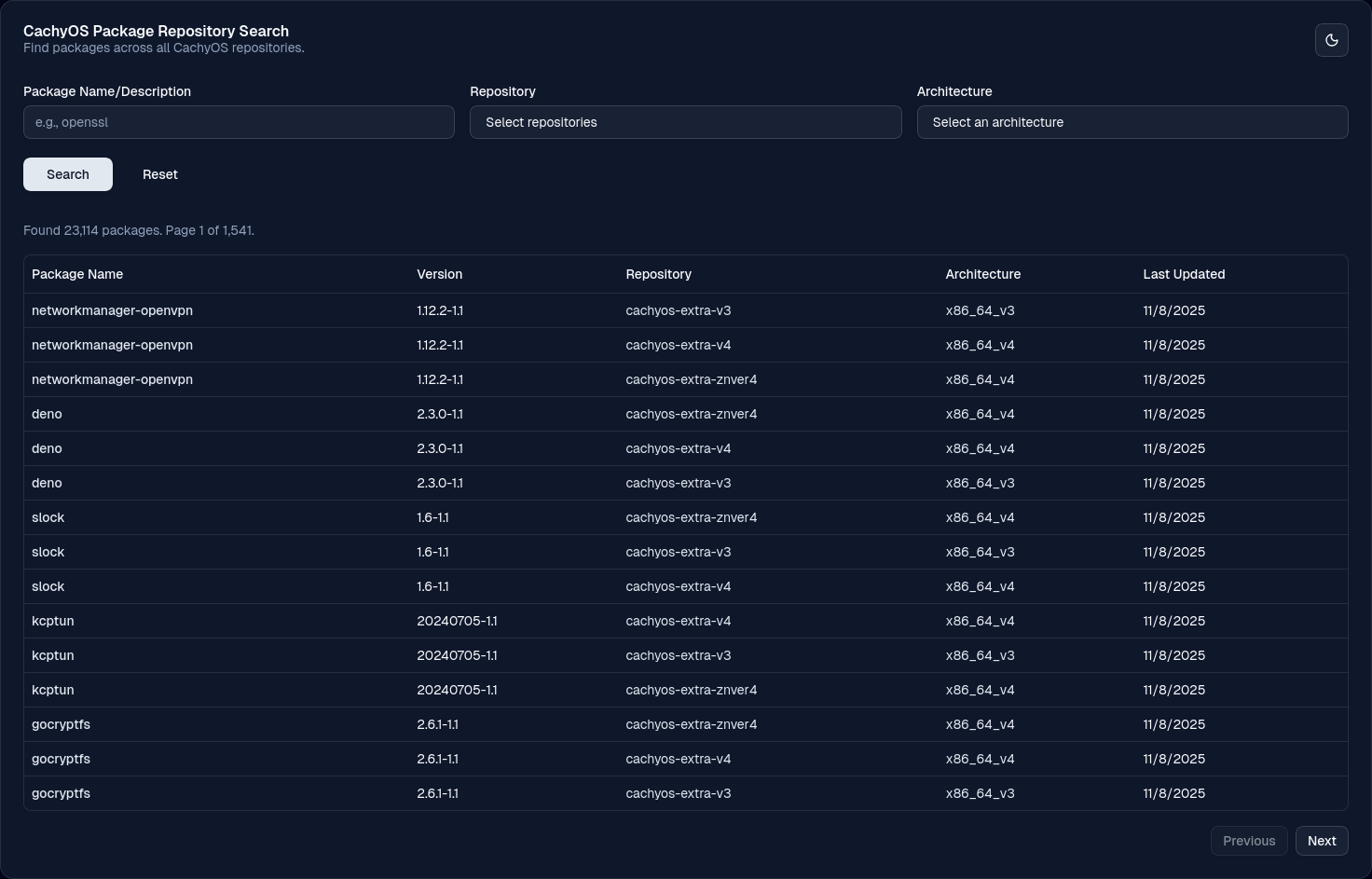
Introducing our new package search page for CachyOS. You can now easily search for packages and access detailed information, such as their compilation architecture, last update date, and more.
Migrating from x86-64-v3 to x86-64-v4 or znver4
Section titled “Migrating from x86-64-v3 to x86-64-v4 or znver4”If you’re currently using the x86-64-v3 repositories and your new CPU supports x86-64-v4 (or AMD Zen 4/5), you can migrate by following these steps:
Checking CPU Compatibility
Section titled “Checking CPU Compatibility”- Verifying
x86-64-v4support:Run the following command: /lib/ld-linux-x86-64.so.2 --help | grep supported- ✅
x86-64-v4 (supported, searched)→ CPU supports v4 - ❌ No
x86-64-v4line → CPU does not support v4
- ✅
Example (CPU supports v4):
$ /lib/ld-linux-x86-64.so.2 --help | grep supported x86-64-v2 (supported, searched) x86-64-v3 (supported, searched) x86-64-v4 (supported, searched)- For AMD Zen 4/5 CPUs, check if your CPU reports znver4 or znver5:
- Run the following command:
If the output is
Terminal window gcc -march=native -Q --help=target 2>&1 | grep -Po "^\s+-march=\s+\K(\w+)\$"znver4orznver5, you can proceed with the migration.
- Run the following command:
Migration Steps
Section titled “Migration Steps”-
Edit
/etc/pacman.confand replace yourx86-64-v3repositories with one of the following depending on your CPU support:/etc/pacman.conf [cachyos-v4]Include = /etc/pacman.d/cachyos-v4-mirrorlist[cachyos-core-v4]Include = /etc/pacman.d/cachyos-v4-mirrorlist[cachyos-extra-v4]Include = /etc/pacman.d/cachyos-v4-mirrorlist/etc/pacman.conf [cachyos-znver4]Include = /etc/pacman.d/cachyos-v4-mirrorlist[cachyos-core-znver4]Include = /etc/pacman.d/cachyos-v4-mirrorlist[cachyos-extra-znver4]Include = /etc/pacman.d/cachyos-v4-mirrorlistKeep
[cachyos],[core],[extra], and[multilib]unchanged. -
Clear the package cache and synchronize databases:
Terminal window sudo pacman -Scc # Confirm with 'y' twicesudo pacman -Sy -
Reinstall all packages to switch to the new architecture:
Terminal window pacman -Qqn | sudo pacman -S - -
Reboot your system.
Adding Our Repositories to an Existing Arch Linux Install
Section titled “Adding Our Repositories to an Existing Arch Linux Install”We provide a script that automates the installation of our repositories to your existing Arch-based installs.
curl https://mirror.cachyos.org/cachyos-repo.tar.xz -o cachyos-repo.tar.xztar xvf cachyos-repo.tar.xz && cd cachyos-reposudo ./cachyos-repo.sh-
Install CachyOS keyring:
Terminal window # Import the repository keysudo pacman-key --recv-keys F3B607488DB35A47 --keyserver keyserver.ubuntu.com# Sign the repository keysudo pacman-key --lsign-key F3B607488DB35A47 -
Install the necessary packages:
Terminal window sudo pacman -U 'https://mirror.cachyos.org/repo/x86_64/cachyos/cachyos-keyring-20240331-1-any.pkg.tar.zst' \'https://mirror.cachyos.org/repo/x86_64/cachyos/cachyos-mirrorlist-27-1-any.pkg.tar.zst' \'https://mirror.cachyos.org/repo/x86_64/cachyos/cachyos-v3-mirrorlist-27-1-any.pkg.tar.zst' \'https://mirror.cachyos.org/repo/x86_64/cachyos/cachyos-v4-mirrorlist-27-1-any.pkg.tar.zst' \'https://mirror.cachyos.org/repo/x86_64/cachyos/pacman-7.1.0.r9.g54d9411-4-x86_64.pkg.tar.zst' -
Add the CachyOS repositories to the pacman config file:
/etc/pacman.conf # If your CPU only supports x86-64, then add the [cachyos] repositories# cachyos repos[cachyos]Include = /etc/pacman.d/cachyos-mirrorlist# If your CPU supports x86-64-v3, then add [cachyos-v3],[cachyos-core-v3],[cachyos-extra-v3] and [cachyos]# cachyos repos[cachyos-v3]Include = /etc/pacman.d/cachyos-v3-mirrorlist[cachyos-core-v3]Include = /etc/pacman.d/cachyos-v3-mirrorlist[cachyos-extra-v3]Include = /etc/pacman.d/cachyos-v3-mirrorlist[cachyos]Include = /etc/pacman.d/cachyos-mirrorlist# If your CPU supports x86-64-v4, then add [cachyos-v4], [cachyos-core-v4], [cachyos-extra-v4] and [cachyos]# cachyos repos[cachyos-v4]Include = /etc/pacman.d/cachyos-v4-mirrorlist[cachyos-core-v4]Include = /etc/pacman.d/cachyos-v4-mirrorlist[cachyos-extra-v4]Include = /etc/pacman.d/cachyos-v4-mirrorlist[cachyos]Include = /etc/pacman.d/cachyos-mirrorlist# If your CPU is based on Zen 4 or Zen 5, add [cachyos-znver4], [cachyos-core-znver4], [cachyos-extra-znver4] and [cachyos][cachyos-znver4]Include = /etc/pacman.d/cachyos-v4-mirrorlist[cachyos-core-znver4]Include = /etc/pacman.d/cachyos-v4-mirrorlist[cachyos-extra-znver4]Include = /etc/pacman.d/cachyos-v4-mirrorlist[cachyos]Include = /etc/pacman.d/cachyos-mirrorlist -
Finally, update your system with CachyOS packages:
Terminal window sudo pacman -Syu
Uninstalling CachyOS Repositories
Section titled “Uninstalling CachyOS Repositories”Run the following commands to remove the CachyOS repositories from your system:
curl https://mirror.cachyos.org/cachyos-repo.tar.xz -o cachyos-repo.tar.xztar xvf cachyos-repo.tar.xzcd cachyos-reposudo ./cachyos-repo.sh --remove- Reinstall the original pacman from Arch Linux:
Terminal window sudo pacman -S core/pacman - Execute the following command:
Terminal window # This avoids getting %INSTALLED_DB% warningssudo find /var/lib/pacman/local/ -type f -name "desc" -exec sed -i '/^%INSTALLED_DB%$/,+2d' {} \; - Restore the pacman config file from backup:
Terminal window sudo mv /etc/pacman.conf.bak /etc/pacman.conf - Switch back to the default Arch Linux packages with the following commands:
Terminal window pacman -Qqn | sudo pacman -S -sudo pacman -Syu
Tests and benchmarks
Section titled “Tests and benchmarks”Michael from Phoronix has already benchmarked CachyOS a couple of times, which is shown mostly leading in the benchmark graphs and on the Geometric Mean of All Test Results. Since the first benchmark made back in 2022, CachyOS has evolved and matured a lot more in terms of usability and performance.
If you would like to know more about the performance uplift from our repositories, please check the links below.
-
14/03/2021: In a RFC discussion about the impact of x86-64-v3 was started by Mateusz Jończyk from Arch Linux showed some initial results.
-
09/12/2022: First benchmark done by Michael.
-
29/02/2024: Phoronix conducted another benchmark demonstrating the difference between x86-64-v4, x86-64-v3 and x86-64 (generic) Packages. Looking at the examples like PHP or GCC, where we customize our PKGBUILDs there is a noticeable performance improvement.
-
20/08/2024: Michael posted a new benchmark for the AMD Ryzen 9950x on which it includes CachyOS and some others Linux Distributions.