
How to navigate the CachyOS Wiki
Here are some tips to help you get the most out of the CachyOS wiki, including features that are easy to miss.
- Contribute Feedback: If you have a suggestion or find an error in the documentation, you can help us improve!
- At the bottom of each page, you’ll find an
Edit pagebutton that takes you directly to the corresponding file on GitHub where you can propose changes. - Alternatively, you can open a new issue on our GitHub repository.
- At the bottom of each page, you’ll find an
- Search is Your First Tool: Use the search bar at the top of the page (to the right of the CachyOS logo) to quickly find information related to your question or issue.
- Navigate with the Sidebars:
-
The left sidebar is scrollable and contains the main table of contents for the entire documentation. Use it to explore different sections.
-
Don’t forget the right sidebar. It often contains a helpful overview of the current page’s sections, allowing for quick navigation.
-
- Look for Interactive Elements:
- Tabs: Some pages use tabs to organize related content. Be sure to check all available tabs for the information you need.
- Example:

- Example:
- Expandable Sections: Content that is collapsed under a clickable header (like “Manual Installation (Advanced)”) can be expanded to reveal more detailed information.
- Example:
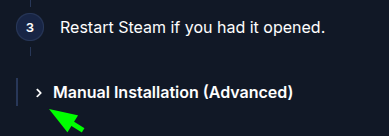
- Example:
- Tabs: Some pages use tabs to organize related content. Be sure to check all available tabs for the information you need.
- Useful Features:
- Code Blocks: All code blocks have a
Copy to clipboardbutton on the top-right for easy copying.- Example:

- Example:
- Hyperlinks: Keep an eye out for underlined and/or colored text. These are links to other parts of the wiki or external resources for further reading.
- Code Blocks: All code blocks have a
- Pay close attention to notes, tips, warnings, and cautions. They contain important information that can help you avoid common pitfalls and solve problems faster.
- Example:

- Example: